1、什么是注解 annotation的作用
不是程序本身,可以对程序作出解释(这一点和注释(comment)没什么区别)
可以被其他程序(比如:编译器等)读取
可以在编译、类加载、运行时被读取
annotation在哪里使用
可以附加在package、class、method、filed等上面,相当于给他们添加了额外的辅助信息,我们可以通过反射机制编程实现对这些元数据的访问
@Override public String toString ()
2、内置注解
@Override :表示一个方法声明打算重写超类中的另一个方法声明
@Deprecated / [ˈdeprəkeɪtɪd] :用于修饰方法、属性、类,表示不鼓励程序员使用这些的元素
@SuppressWarnings :用来抑制编译时警告信息,需要添加一个参数
@FunctionalInterface:指定接口必须是函数式接口,否则编译器报错
@SafeVarargs:来抑制堆污染警告
1 2 3 4 5 6 7 8 9 10 11 12 13 14 15 16 17 18 19 20 21 22 23 24 package com.lesson7.demo1;import java.util.ArrayList;import java.util.List;public class Demo @Override public String toString () return "" ;@Deprecated public static void test () "Deprecated" );@SuppressWarnings("all") public static void test1 () new ArrayList();public static void main (String[] args)
3、元注解
元注解的作用就是负责注解 自定义注解 注解,Java定义了4个标准的元注解类型,他们被用来提供对其他注解类型作说明
四个元注解
@Target:表示描述注解的使用范围(表示我们的注解可以在哪里用)
@Retention/[rɪˈtenʃn]:表示需要在什么级别保存该注释信息,用于描述注解的生命周期(runtime>class>sources)
@Documented: 表示我们是否要将我们的注解生成在Javadoc文档中
@Inherited/[ɪnˈherɪtɪd] 表示子类可以继承父类的注解
1
2
3
4
5
6
7
8
9
10
11
12
13
14
15
16
17
18
19
20
21
22
23
24
package com.lesson7.demo1;import java.lang.annotation.*;@MyAnnotation public class Demo2 public void test () @Target(value = {ElementType.METHOD,ElementType.TYPE}) @Retention(value = RetentionPolicy.RUNTIME) @Documented @Inherited @interface MyAnnotation{
4、自定义注解
使用@interface关键字自定义注解
格式:public @interface 注解名{定义内容}
1 2 3 4 5 6 7 8 9 10 11 12 13 14 15 16 17 18 19 20 21 22 23 24 25 26 27 28 29 package com.lesson7.demo1;import java.lang.annotation.ElementType;import java.lang.annotation.Retention;import java.lang.annotation.RetentionPolicy;import java.lang.annotation.Target;public class Demo3 @Annotation(age = 18,name = "小明") public void test () @Annotation2("") public void test2 () @Target({ElementType.TYPE,ElementType.METHOD}) @Retention(RetentionPolicy.RUNTIME) @interface Annotation{String name () default "" ;int age () int id () default -1default {"实验小学" ,"小明中学" };@Target({ElementType.TYPE,ElementType.METHOD}) @Retention(RetentionPolicy.RUNTIME) @interface Annotation2{String value () ;
5、反射 Java反射机制:程序在运行过程中,可以构造任意一个类的对象,可以了解任意一个类的属性和方法,并且可以调用任意一个对象的属性和方法。这种动态获取程序的信息以及动态调用对象的功能被称为Java反射机制
概念:
反射式Java被视为动态语言的关键,反射机制允许程序在执行期借助reflection API 取得任何类内部的信息,并能直接操作任意对象的内部属性及方法
正常方式:引入需要的”包类”名称—>通过new实例化—->取得实例化对象
反射方式:实例化对象—>getClass()方法—->得到完整的”包类”名称
Java反射机制提供的功能
在运行时判断任意一个对象所属的类
在运行时构造任意一个类的对象
在运行时判断任意一个类所具有的成员变量和方法
在运行时获取泛型信息
在运行时调用任意一个对象的成员变量和方法
在运行时处理注解
生成动态代理
优点和缺点
6、获取反射对象 1 2 3 4 5 6 7 8 9 10 11 12 13 14 15 16 17 18 19 20 21 22 23 24 25 26 27 28 29 30 31 32 33 34 35 36 37 38 39 40 41 42 43 44 45 46 47 48 49 50 51 52 53 54 55 56 57 58 59 60 61 62 63 64 65 66 package com.lesson7.demo2;public class Test1 public static void main (String[] args) throws ClassNotFoundException "com.lesson7.demo2.User" );"com.lesson7.demo2.User" );"com.lesson7.demo2.User" );"com.lesson7.demo2.User" );class User private String name;private int id;private String sno;public User () public User (String name, int id, String sno) this .name = name;this .id = id;this .sno = sno;public String getName () return name;public void setName (String name) this .name = name;public int getId () return id;public void setId (int id) this .id = id;public String getSno () return sno;public void setSno (String sno) this .sno = sno;@Override public String toString () return "User{" +"name='" + name + '\'' +", id=" + id +", sno='" + sno + '\'' +'}' ;
7、得到Class类实例的几种方式 Class类:
对象照镜子后可以得到的信息:某个类的属性、方法和构造器、某个类到底实现了哪些接口。对于每个类而言,JRE都为其保留一个不变的class类型的对象。一个class对象包含了特定某个结构的相关信息
class本身也是一个类
class对象只能由系统建立对象
一个加载的类在JVM中只会有一个class实例
一个class对象对应的是一个加载到JVM中的一个.class文件
每个类的实例都会记得自己是由那个class实例所生成
通过class可以完整地得到一个类中地所有被加载地结构
class类是reflection地根源,针对任何你想动态加载、运行的类,唯有先获得相应的class对象
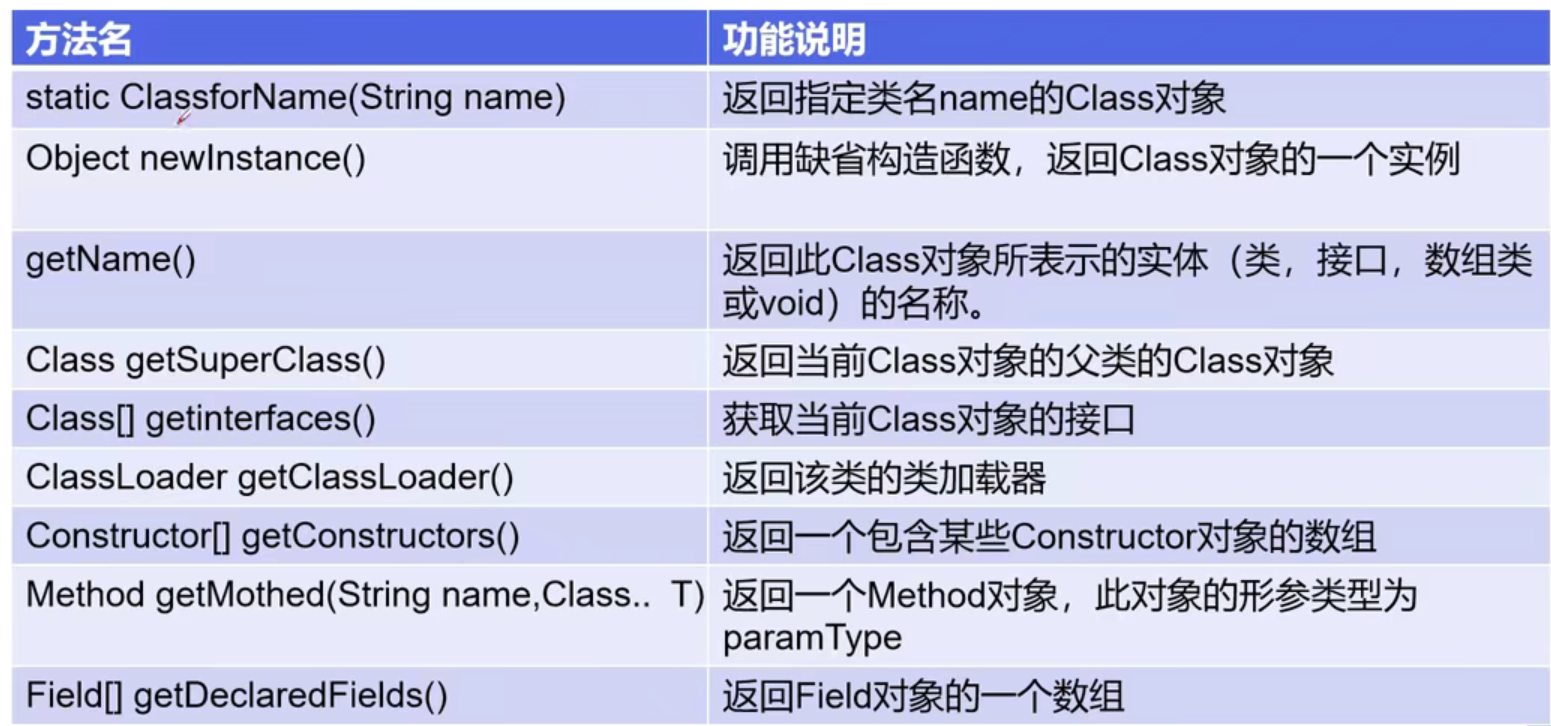
class类常用方法
创建class类的几种方式
1 2 3 4 5 6 7 8 9 10 11 12 13 14 15 16 17 18 19 20 21 22 23 24 25 26 27 28 29 30 31 32 33 34 35 36 37 38 39 40 41 42 43 44 45 46 47 48 49 50 package com.lesson7.demo2;public class Test2 public static void main (String[] args) throws ClassNotFoundException new Student();"这个人是:" +person.name);"com.lesson7.demo2.Student" );class Person public String name;public Person () public Person (String name) this .name = name;@Override public String toString () return "Person{" +"name='" + name + '\'' +'}' ;class Student extends Person public Student () this .name = "学生" ;class Teacher extends Person public Teacher () this .name = "老师" ;
8、所有类型Class对象 1 2 3 4 5 6 7 8 9 10 11 12 13 14 15 16 17 18 19 20 21 22 23 24 25 26 27 28 29 30 31 32 33 package com.lesson7.demo2;import java.lang.annotation.ElementType;public class Test3 public static void main (String[] args) int [][].class;void .class;int [] a = new int [10 ];int [] b = new int [100 ];
9、类加载内存分析
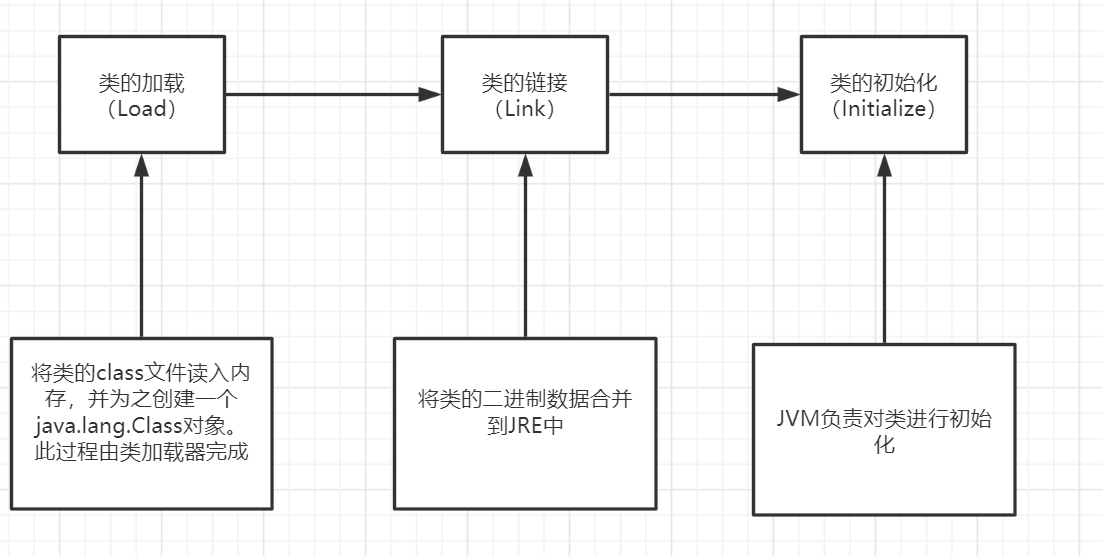
类加载的过程:
当程序主动使用某个类时,如果该类还未被加载到内存中,则系统会通过如下三个步骤来对该类进行初始化
类的加载于ClassLoader的理解
加载:将class文件字节码内容加载到内存中,并将这些静态数据转成方法区的运行时数据结构,然后生成一个代表这个类的java.lang.Class对象
链接:将Java类的二进制代码合并到JVM的运行状态之中的过程
验证:确保加载的类信息符合JVM规范,没有安全方面的问题
准备:正式为类变量(static)分配内存并设置类变量默认初始值的阶段,这些内存都将在方法区中进行分配
解析:虚拟机常量池内的符号引用(常量名)替换为直接引用(地址)的过程
初始化
·执行类构造器()方法的过程。类构造器()方法是由编译期自动收集类中所有类变量的赋值动作和静态代码块中的语句合并产生的。(类构造器是构造类信息的,不是构造该类对象的构造器)
当初始化一个类的时候,如果发现其父类还没有初始化,则需要先触发其父类初始化
虚拟机会保证一个类的()方法在多线程环境中被正确加锁和同步
代码测试
1 2 3 4 5 6 7 8 9 10 11 12 13 14 15 16 17 18 19 20 21 22 23 24 package com.lesson7.demo2;public class Test11 public static void main (String[] args) new A();class A static {"A类静态代码块初始化" );300 ;static int m = 100 ;public A () "A类的无参构造初始化" );100
10、分析类的初始化 类的主动引用
当虚拟机启动,先初始化main方法所在的类
new一个类的对象
调用类的静态成员(除了final常量)和静态方法
使用反射调用
当初始化一个类,如果其父类没有被初始化,则先初始化他的父类
类的被动引用 (不会发生类的初始化)
当访问一个静态域时,只有真正声明这个域的类才会被初始化。如:通过子类引用父类的静态变量,不会导致子类初始化
通过数组定义类引用,不会触发此类的初始化
引用常量不会触发此类的初始化(常量在链接阶段就存入调用类的常量池中了)
1 2 3 4 5 6 7 8 9 10 11 12 13 14 15 16 17 18 19 20 21 22 23 24 25 26 27 28 29 30 31 32 33 public class Test4 static {"Main类被加载" );public static void main (String[] args) throws ClassNotFoundException class Father static int b = 2 ;static {"父类被加载" );class Son extends Father static {"子类被加载" );300 ;static int m = 100 ;static final int M = 1 ;
11、类加载器 类加载器作用:
将class文件字节码内容加载到内存中,并将这些静态数据转换成方法区的运行是数据结构,然后再堆中生成一个代表这个类的java.lang.Class对象,作为方法区中类数据的访问入口
类缓存:
标准的JavaSE类加载器可以按要求查找类,但一旦某个类被加载到类加载器中,它将维持加载(缓存)一段时间。不过JVM垃圾回收机制可以回收这些Class对象
1 2 3 4 5 6 7 8 9 10 11 12 13 14 15 16 17 18 19 20 21 22 23 24 25 26 27 28 29 30 31 32 33 34 35 36 37 38 39 40 41 42 43 44 45 46 47 48 49 50 51 52 53 54 55 56 57 58 59 60 61 62 package com.sise.reflection;public class Test4 public static void main (String[] args) throws ClassNotFoundException "com.sise.reflection.Test4" ).getClassLoader();"java.lang.Object" ).getClassLoader();"java.class.path" ));
12、获取类运行的结构 1 2 3 4 5 6 7 8 9 10 11 12 13 14 15 16 17 18 19 20 21 22 23 24 25 26 27 28 29 30 31 32 33 34 35 36 37 38 39 40 41 42 43 44 45 46 47 public class Test6 public static void main (String[] args) throws ClassNotFoundException, NoSuchFieldException, NoSuchMethodException "com.lesson7.demo2.User" );for (Field field : fields) {"name" );for (Method method : methods) {"正常的" +method);for (Method method : methods) {"getDeclaredMethods" +method);"getName" , null );"setName" , String.class);for (Constructor constructor : constructors) {for (Constructor constructor : constructors) {"#" +constructor);int .class, String.class);"指定" +declaredConstructor);
13、动态创建对象执行方法 创建类的对象:调用Class对象的newinstance()方法
类必须有一个无参构造器
类的构造器的访问权限需要足够
思考?
难道没有无参构造器就不能创建对象了吗?只要操作的时候明确的调用类中的构造器并将参数传递进去之后,才可以实例化操作
步骤如下:
通过Class类的getDeclaredConstuctor(Class … parameterTypes)取得本类的指定行参类型构造器
向构造器的形参中传递一个对象组进去,里面包含了构造器中所需的各个参数
通过Constructor实例化对象
调用指定的方法
通过反射,调用类中的方法,通过Method类完成
通过Class类的getMethod(String name,Class…parameterType)方法取得一个Method对象,并设置此方法操作时所需要的参数类型
之后使用Object invoke(Object obj,Object[] args)进行调用,并向方法中传递要设置的obj对象的参数信息
Object invoke(Object obj, Object … args)
Object对应原方法的返回值,若原方法无返回值,此时返回null
若原方法若为静态方法,此时形参Object obj可以null
若原方法形参列表为空,则Object[] args为null
若原方法声明为private,则需要在调用此invoke()方法前,显式调用方法对象的setAccessible(true)方法,将可访问private的方法
setAccessible
method和field、constuctor对象都有setAcessible()方法
setAccessible作用是启动和禁用访问安全检查的开关
参数值为true则指示反射的对象在使用时应该取消Java语言访问检查
提高反射的效率。如果代码中必须用反射,而该句代码需要频繁的被调用,那么请设置为true
是的原本无法访问的私有成员也可以访问
参数值为false则指示反射的对象应该实施Java语言访问检查
1 2 3 4 5 6 7 8 9 10 11 12 13 14 15 16 17 18 19 20 21 22 23 24 25 26 27 28 29 30 31 32 33 34 35 36 37 package com.lesson7.demo2;import java.lang.reflect.Constructor;import java.lang.reflect.Field;import java.lang.reflect.InvocationTargetException;import java.lang.reflect.Method;public class Test7 public static void main (String[] args) throws ClassNotFoundException, IllegalAccessException, InstantiationException, NoSuchMethodException, InvocationTargetException, NoSuchFieldException "com.lesson7.demo2.User" );int .class, String.class);"小明" , 011 , "19445546" );"setName" , String.class);"小明" );"name" );true );"小红" );
14、分析性能问题 1 2 3 4 5 6 7 8 9 10 11 12 13 14 15 16 17 18 19 20 21 22 23 24 25 26 27 28 29 30 31 32 33 34 35 36 37 38 39 40 41 42 43 44 45 46 47 48 package com.lesson7.demo2;import java.lang.reflect.InvocationTargetException;import java.lang.reflect.Method;public class Test8 public static void main (String[] args) throws NoSuchMethodException, IllegalAccessException, InvocationTargetException public static void test () new User();long startTime = System.currentTimeMillis();for (int i = 0 ; i < 1000000000 ; i++) {long endTime = System.currentTimeMillis();"普通方法执行10亿次:" +(endTime-startTime)+"ms" );public static void test2 () throws NoSuchMethodException, InvocationTargetException, IllegalAccessException new User();"getName" , null );long startTime = System.currentTimeMillis();for (int i = 0 ; i < 1000000000 ; i++) {null );long endTime = System.currentTimeMillis();"反射方式执行10亿次:" +(endTime-startTime)+"ms" );public static void test3 () throws NoSuchMethodException, InvocationTargetException, IllegalAccessException new User();"getName" , null );true );long startTime = System.currentTimeMillis();for (int i = 0 ; i < 1000000000 ; i++) {null );long endTime = System.currentTimeMillis();"关闭检测方式执行10亿次:" +(endTime-startTime)+"ms" );
15、获取泛型信息 反射操作泛型:
Java采用泛型擦除的机制来引入泛型,Java中的泛型仅仅是给编译器javac使用的,确保数据的安全性和免去强制类型转换问题,但是,一旦编译完成,所有和泛型有关的类型全部擦除
为了通过反射操作这些类型,Java新增了ParameterizedType,GenericArrayType,TypeVariable和WildcardType几种类型来代表不能被归一到Class类中的类型但是又和与原始类型齐名的类型
ParameterizedType:表示一种参数化类型,比如Collection
GenericArrayType:表示一种元素类型是参数化类型或者类型变量的数组类型
TypeVariable:是各种类型变量的公共父接口
WildcardType:代表一种通配符类型表达式
测试代码:
1 2 3 4 5 6 7 8 9 10 11 12 13 14 15 16 17 18 19 20 21 22 23 24 25 26 27 28 29 30 31 32 33 34 35 36 37 38 39 import java.lang.reflect.Method;import java.lang.reflect.ParameterizedType;import java.lang.reflect.Type;import java.util.List;import java.util.Map;public class Test10 public void test (Map<String,User> map, List<User> list) "test" );public Map<String,User> test1 () "test1" );return null ;public static void main (String[] args) throws NoSuchMethodException "test" , Map.class, List.class);for (Type genericParameterType : genericParameterTypes) {"#" +genericParameterType);if (genericParameterType instanceof ParameterizedType){for (Type actualTypeArgument : actualTypeArguments) {"test1" ,null );if (genericReturnType instanceof ParameterizedType){for (Type actualTypeArgument : actualTypeArguments) {
16、获取注解信息 1 2 3 4 5 6 7 8 9 10 11 12 13 14 15 16 17 18 19 20 21 22 23 24 25 26 27 28 29 30 31 32 33 34 35 36 37 38 39 40 41 42 43 44 45 46 47 48 49 50 51 52 53 54 55 56 57 58 59 60 61 62 63 64 65 66 67 68 69 70 71 72 73 74 75 76 77 78 79 80 81 82 83 84 85 86 87 88 89 90 91 package com.lesson7.demo2;import java.lang.annotation.*;import java.lang.reflect.Field;public class Test9 public static void main (String[] args) throws ClassNotFoundException, NoSuchFieldException "com.lesson7.demo2.Student2" );for (Annotation annotation : annotations) {"id" );@table("db_student") class Student2 @field(columnName = "db_id",type = "int",length = 10) private int id;@field(columnName = "db_age",type = "int",length = 10) private int age;@field(columnName = "db_name",type = "varchar",length = 10) private String name;public Student2 () public Student2 (int id, int age, String name) this .id = id;this .age = age;this .name = name;public int getId () return id;public void setId (int id) this .id = id;public int getAge () return age;public void setAge (int age) this .age = age;public String getName () return name;public void setName (String name) this .name = name;@Override public String toString () return "Student2{" +"id=" + id +", age=" + age +", name='" + name + '\'' +'}' ;@Target(ElementType.TYPE) @Retention(RetentionPolicy.RUNTIME) @interface table{String value () ;@Target(ElementType.FIELD) @Retention(RetentionPolicy.RUNTIME) @interface field{String columnName () ;String type () ;int length ()